UVA_HR
UVA Education Benefits Program
UVA encourages our employees to be lifelong learners who expand their knowledge through education. The University’s Cornerstone Plan guides us to “invest in employees to foster a culture of excellence and achievement." The Education Benefits Program puts those beliefs into practice to help you reach your educational and professional goals. As a Medical Center team member, you can earn a degree, take a review course for professional certification, or earn a professional certification from an accredited institution. As an Academic Division employee, you can earn a degree or professional certificate from an accredited institution, take continuing education courses, and/or attend a conference related to your work. UPG employees are encouraged to become more proficient in their occupation and professions by advancing their education in areas that have a vocational relationship to their current or future roles at UPG. Education benefits enable you to accomplish this by providing financial support.
TRANSLATION SERVICE: If you wish to translate any of the pdf documents attached in the sidebar of this page, please cut and paste the text into Google Translate in your browser, 3900 or less characters at a time.
What are Education Benefits?
Academic Division
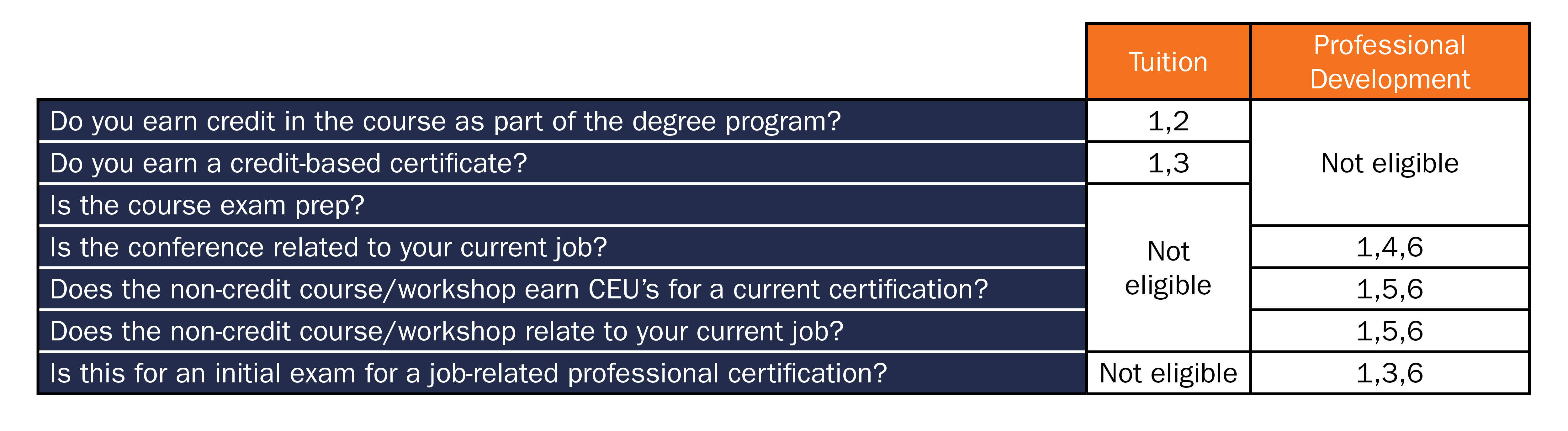
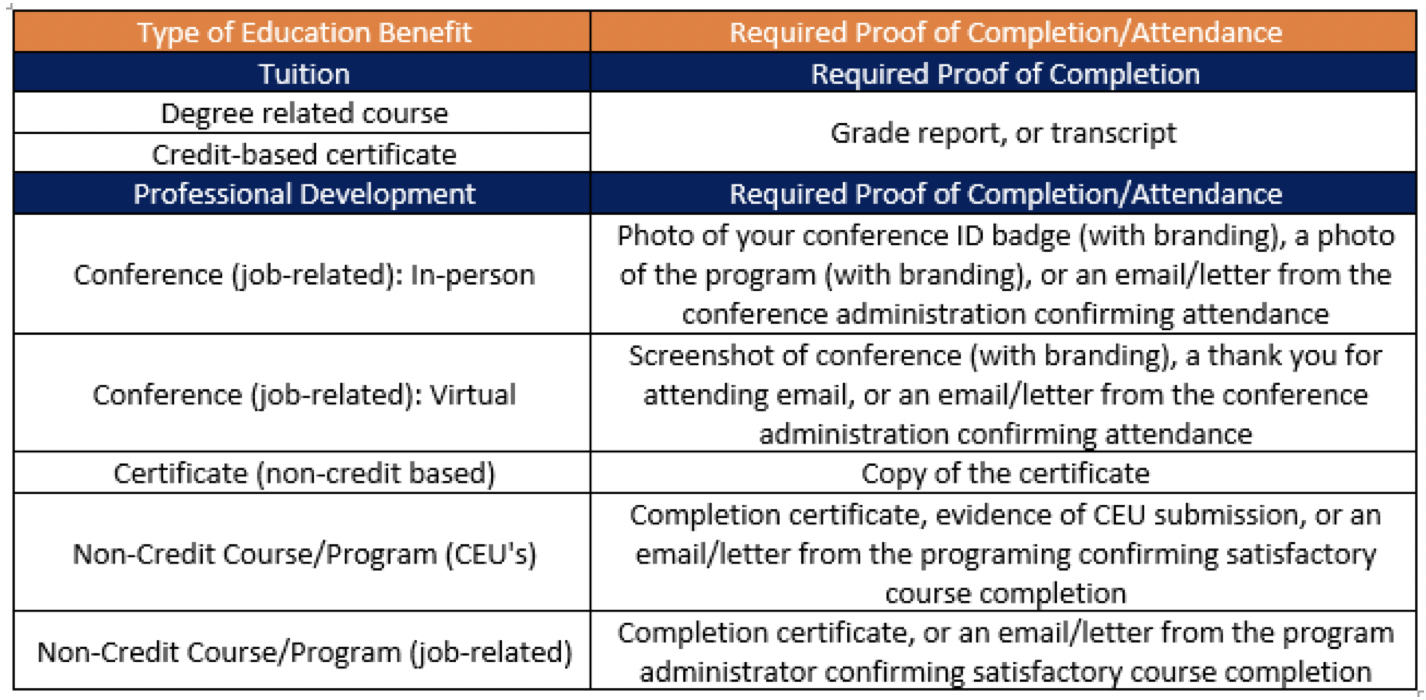
To increase the career building opportunities available to employees at the University of Virginia, enhance the performance of staff members and their units, and encourage professional growth, the University offers an Education Benefit that includes two components:
- Tuition
- Professional Development
These are two separate offerings with different requirements and financial amounts. In addition, departments may choose to offer additional education benefits through departmental funding.
Education Benefits are paid through your paycheck within two pay periods from the date of approval. Employees are encouraged to submit requests far enough in advance to obtain approval prior to registering for courses.
Medical Center
To recruit, develop, engage, and retain a quality workforce requires investment in the ongoing career and educational goals of employees. The Medical Center provides centrally funded Education Assistance for professional credentialing certification and academic coursework that includes two components:
- Centrally Funded Tuition Assistance - for courses earning college credit taken towards a degree
- Centrally Funded Professional Credentialing Certification - for job-related credentialing certifications, or eligible courses (English as a Second Language - ESL, literacy and related classes, LEAN or other related classes, or review course for a professional credentialing certification that is of value/benefit to the Medical Center)
These are two separate offerings with different requirements and financial amounts. In addition, departments may choose to offer additional education benefits through departmental funding for courses or educational activities agreed upon by you and your department. These may be expenses for either tuition or professional credentialing certification assistance that are ineligible, or funding beyond the $5,250 that is allotted for you from UVA. Departmental funding varies according to availability of a funding source to support team member education opportunities.
Education Assistance is paid through your paycheck within two pay periods from the date of approval. Team members are encouraged to submit requests far enough in advance to obtain approval prior to registering for courses.
Watch this short video to learn about the 2023 changes to your education benefit.
Medical Center Team Members, Come Meet with Us in Person!
Meet with an HR benefits counselor in the Medical Center Dining Conference Room 3 every month in 2023, from 7 am to 3 pm. Discuss your education and other UVA benefits and ask questions. No appointments necessary; walk ins are welcome.
Upcoming dates:
- Wednesday, Feb. 15 | 7 am - 3 pm
- Wednesday, Mar. 15 | 7 am - 3 pm
- Wednesday, Apr. 12 | 7 am - 3 pm
- Wednesday, May 17 | 7 am - 3 pm
- Wednesday, Jun. 14 | 7 am - 3 pm
- Wednesday, Jul. 12 | 7 am - 3 pm
- Wednesday, Aug. 16 | 7 am - 3 pm
- Wednesday, Sep. 13 | 7 a.m - 3 pm
- Wednesday, Oct. 11 | 7 a.m - 3 pm
- Wednesday, Nov. 15 | 7 a.m - 3 pm
- Wednesday, Dec. 13 | 7 a.m - 3 pm